New Lacerte Tax Customer Only: For new Intuit Lacerte Tax software customers only, 50% off the monthly plan price for 1, 2, or 3 new users of Hosting for the first 4 months of service starting from the date of purchase, followed by the then-current monthly fee for Hosting. Promotional pricing for hosting is based on 12 months of
service using the number of authorized users on your account. Offer valid through December 31, 2024. Your account will automatically be charged monthly until you cancel. This discount cannot be combined with any other Intuit offer. Limited to one per customer. Sales tax may be applied where applicable. During the discount period, you cannot add
or remove users to the Hosting service; otherwise, the discount will be voided. For more information, please visit https://proconnect.intuit.com/desktop-hosting/ .
New customer price: Sale price is available to first time purchasers of the product only (sorry no renewals). The sale price is good for the first year only. In year two, regular renewal fee applies to continue use of the product. Prices are subject to change without notice. Returns can be filed on extension for current tax year
only, but all 1040 and individual state returns must be used by December 31 of the following year or they will expire.
Money back guarantee: If you are not satisfied for any reason with the software and are a new customer with respect to that software or service, you will receive a refund equal to the software license fee paid. For full terms, visit
https://accountants.intuit.com/guarantee/
Additional services: Subscription for package or per-user basis required for add-on services. Account may be automatically charged until you cancel. Sales tax may be applied where applicable. Additional terms, conditions, and limitations apply, and persistent internet connection, supported browser, or mobile device and supported
operating system required.
Trial information: The Lacerte trial includes either a Lacerte tax software download or access to hosted software for tax year 2023. The desktop trial software will not e-file or print. The hosted trial will not save. New customers only.
Product terms: Fast Path required to access functionality in Lacerte services (sold separately). Terms, conditions, pricing, subscriptions, tax forms, packages, features, service, and support options are subject to change at any time without notice. For more details, visit
https://accountants.intuit.com/tax-software/lacerte/
Hosting for Lacerte
Hosting for Intuit Lacerte is a monthly add-on subscription service. Purchase of Fast Path services for Intuit Lacerte is also required for concurrent user activity within Hosting for Intuit Lacerte. Additional terms, conditions, and limitations apply. Pricing, features, service and support options are subject to change at any time without
notice. For more information, please visit https://proconnect.intuit.com/desktop-hosting/.
Rightworks
Hosting for Lacerte and ProSeries is powered by Rightworks. Contact Rightworks to contract additional third-party software.
Rightworks performs backups of all hosted data on a nightly basis and retains the back-ups for a rolling 90-day period in a protected offsite facility as an additional level of protection. Rightworks maintains robust security enhancements, including enhanced firewall protection, encryption protocols, and security audits. There is
no limitation to the size of a customer's tax and business-related data back-up. Customers are responsible for verifying the integrity of hosted data at least every 90 days. Rightworks employs Snapshot technology to backup customer data. Snapshots are taken daily and then replicated to another physical Rightworks facility for Disaster Recovery.
Rightworks maintains compliance with international security standards and regulations, including IRS Security Six compliance.
Rightworks uses top-tier data centers and multiple layers of redundancy within its infrastructure to provide 24x7 availability. However, availability can vary, is subject to occasional downtime, and may change without notice. Rightworks encrypts all backup files and backup tapes. Virtual desktop connections are protected via TLS
with a minimum of 128-bit encryption and authentication. Each customer has a unique Rightworks virtual desktop. Access to each Intuit ProSeries or Intuit Lacerte company file is controlled at multiple layers including file access permissions. Access is locked out after multiple failed login attempts for the same user. Security features,
functionality, and access are subject to change without notice as deemed necessary by Rightworks. Availability can vary and are subject to occasional downtime and may change without notice. Click here for a list of compatible devices.
Add-on Services and Integrations
Microsoft Excel and Microsoft Outlook integration with Lacerte or ProSeries in the hosted environment requires an existing license for Office 365 Apps for Enterprise, Microsoft 365 Business Premium, Office 365 for Enterprise—E3, or Office 365 for Enterprise—E5. If you already have one of these licenses, you can bring it over on your own, or
purchase a separate license through Rightworks or another provider. Intuit supports third-party applications that integrate with Lacerte and ProSeries in the following such capacity, including but not limited to: application installation, application set-up, tax product integration, technical and/or login issues within Rightworks, etc. Intuit
does not provide technical support for in-application issues.
Adobe: The following Adobe integrations are supported: Adobe Acrobat Pro for Teams (subscription required), Adobe Acrobat Pro for Individuals (subscription required), Adobe Acrobat Standard for Teams (subscription required), Adobe Acrobat Standard for Individuals (subscription required), and Adobe Acrobat Reader (no subscription required).
Hosting for supported versions of QuickBooks Desktop (Enterprise, Enterprise Accountant, Premier, Premier Accountant, Pro) is included in the Advanced and Premium offerings of Hosting for ProSeries Tax or Lacerte Tax. Intuit provides QuickBooks product support for three years from the time of purchase. Quickbooks Desktop integration with Lacerte
or ProSeries in the hosted environment requires an existing license for QuickBooks Desktop Enterprise, Enterprise Accountant, Premier, Premier Accountant, or Pro. If you already have one of these licenses, you can bring it over on your own, or purchase a separate license through Intuit or another provider. Additional applications are also
included in the Business, Advanced, and Premium offerings of Hosting for ProSeries Tax or Lacerte Tax. Applications not included in any of the Hosting offerings (Business, Advanced, or Premium) cannot be added to your hosted environment at this time. Additional terms, conditions, and limitations may apply. Pricing, features, service and support
options are subject to change at any time without notice.
Rightworks may also offer additional third party services, not core to Lacerte or ProSeries, for an additional fee.
The Signature pad functionality within DMS is not supported in the Lacerte and ProSeries hosted environments at this time.
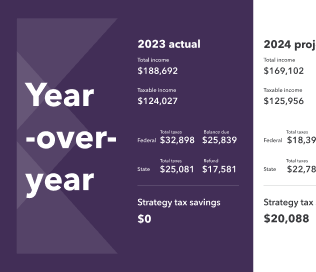
Intuit Tax Advisor: Intuit Tax Advisor is offered as an optional service through December 31, 2024. Additional terms, conditions and fees apply. Starting on or after January 1, 2025, access requires Fast Path for each Lacerte user or User Access for each ProConnect Tax Online user who is required to create and prepare Intuit Tax
Advisor plans. Any advisory impact is speculative and not guaranteed. Additional terms and conditions may apply.
eSignature: The ability to add eSignature fields to all forms and documents, including business forms, has been enabled and is designed to be used at the preparer’s discretion. Per the current IRS Guidelines, electronic signatures are only accepted for the Individual Modules. Please review IRS Publication 4163 and PMTA- 2018-08
for more detail. It is your responsibility to keep updated and compliant on which forms can be used/recognized in connection with federal and state e-file tax returns and authorizations. Additional terms, conditions and fees apply.